Votre panier est vide
Il semble que vous n'ayez encore rien ajouté à votre panier


Bambu Lab PLA Palette: How Five Filaments Create 180+ Colours
What if you could create more than 180 colour combinations using just five filament colours?
That's the idea behind Bambu Lab PLA Palette, a filament collection designed to expand your colour options without requiring an entire shelf of individual filament spools. By combining five carefully selected base colours through layered mixing, PLA Palette gives makers more flexibility when creating colourful 3D prints.
Whether you're printing decorative pieces, models, signs, or custom designs, this system offers an interesting way to explore colour in FDM 3D printing.
Let's take a closer look at how Bambu Lab PLA Palette works and what makes it different from traditional PLA filament.
What Is Bambu Lab PLA Palette?
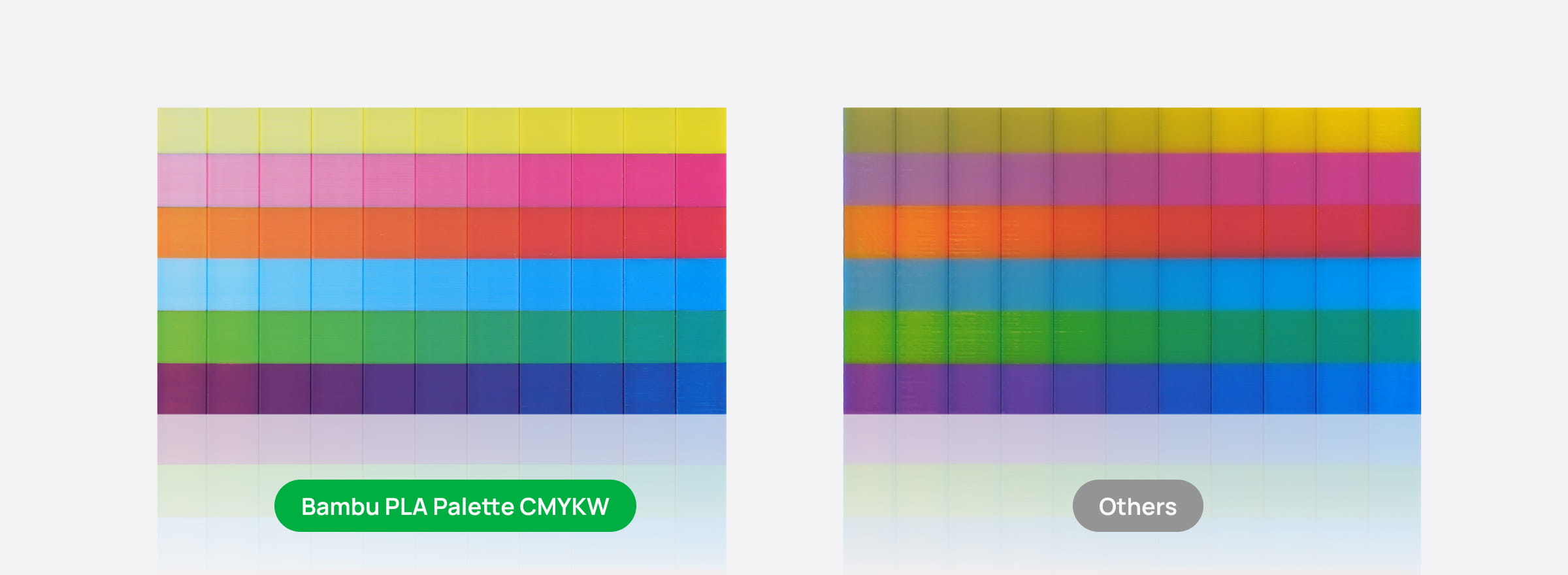
Bambu Lab PLA Palette is a colour-mixing filament system built around five base colours:
-
Cyan
-
Magenta
-
Yellow
-
White
-
Key (translucent black)
Rather than purchasing dozens of different filament colours, PLA Palette uses these five carefully selected bases to produce more than 180 colour combinations through layered mixing.
Each colour has a specific role in the blending process. Cyan, magenta, and yellow provide the main colour range, white helps create lighter shades, and translucent black adds depth and darker tones.
The result is a versatile colour system that gives creators more options while keeping their filament collection compact.
How Do Five Filaments Create 180+ Colours?
The secret is layered colour mixing.
Instead of relying only on the original colour of a filament, PLA Palette combines different base colours in carefully controlled layers. By changing the combination and proportions of the colours, the system can produce a wide range of results.
Think of it as having a small collection of primary colours that can be combined to create a much larger palette.
For example:
-
Cyan and yellow combinations can produce green tones.
-
Magenta and yellow combinations can produce orange and red tones.
-
Cyan and magenta combinations can produce purple tones.
-
Adding white can create lighter variations.
-
Adding translucent black can introduce darker shades and visual depth.
The exact result depends on the selected blend and the way the colours are layered.
This approach gives users more flexibility than simply choosing one pre-made filament colour for every part of a design.
What Makes the Five Base Colours Special?
Each PLA Palette filament has a specific purpose in the colour-mixing process.
1. Cyan, Magenta, and Yellow
These three colours form the foundation of the palette. They can be combined in different proportions to create a broad range of colour variations.
Instead of keeping separate spools for every shade of green, orange, purple, or other colours, users can explore different combinations using the base colours.
2. White for Lighter Shades
White helps produce lighter colour variations and softer tones.
It gives creators another level of control when developing colour combinations for decorative prints, models, and other designs.
3. Key for Darker Shades and Depth
The Key filament is a translucent black designed to work differently from the four opaque base colours.
As more layers of this material build up, light transmission decreases, creating progressively darker tones. This gives the colour system an additional way to introduce depth and shading.
Opaque Colours and Translucent Black: Why Does It Matter?
One of the interesting features of Bambu Lab PLA Palette is the way it combines opaque and translucent materials.
The four main colours — cyan, magenta, yellow, and white — are opaque. According to Bambu Lab's product information, they are formulated to provide strong colour coverage, with less than 1% light transmission at a 2 mm wall thickness.
The Key filament, on the other hand, is translucent. Its appearance changes with thickness, allowing darker tones to develop as additional layers are added.
This combination helps produce more controlled colour results rather than relying on several translucent colours that can make layered blends appear hazy.
It also gives creators another way to introduce shadows and visual depth into their prints.
How Does Bambu Studio Help With Colour Mixing?
Creating custom colours might sound complicated, but Bambu Lab has incorporated a colour-blending database into Bambu Studio.
The database provides colour combinations for PLA Palette, helping users select blends without having to manually experiment with every possible ratio.
This makes the workflow more approachable:
-
Choose your desired colour. Explore the available colour options in the PLA Palette blending database.
-
Select the corresponding blend. Use the database to identify the recommended combination.
-
Prepare your 3D model. Set up your model and colour assignments in Bambu Studio.
-
Preview your design. Review the colour appearance in the slicer before printing.
-
Print your model. Follow the recommended filament and printer settings.
The colour preview gives you a useful reference before starting a print. Keep in mind that the final appearance can still vary depending on lighting, display settings, and viewing conditions.
Cleaner Colour Transitions With PLA Palette
When working with multiple colours, keeping the boundaries between them clean is important.
Bambu Lab uses its PLA Basic base resin for PLA Palette rather than a conventional translucent formulation. The product is designed to reduce stringing and oozing during extrusion and retraction.
Why does this matter?
Unwanted filament movement can affect the appearance of colour transitions. By reducing these effects, PLA Palette is designed to help maintain sharper boundaries between blended colours and reduce muddy-looking edges.
This is particularly useful for prints that feature detailed colour patterns or multiple transitions.
RFID Technology for Easier Printing
Another useful feature is RFID-based filament information.
Bambu Lab embeds printing parameters in the filament's RFID tag, which can be read through a compatible AMS (Automatic Material System).
This helps simplify filament setup by allowing the system to identify supported filament information automatically.
For users already working within the Bambu Lab ecosystem, this can make preparing a print more convenient.
What Can You Create With Bambu Lab PLA Palette?
With more than 180 possible colour combinations, PLA Palette opens up plenty of creative possibilities.
Here are a few project ideas:
Colourful Decorative Models
Create decorative objects with custom colour combinations instead of relying on a single filament shade.
Custom Signs and Labels
Explore different colour combinations for signs, nameplates, and other display pieces.
Miniatures and Display Models
Use a wider range of colour options to add visual interest to models and decorative pieces.
Home Decor
Experiment with layered colours for vases, organizers, desk accessories, and other decorative prints.
Creative Gifts
Personalize printed gifts with colour combinations that match a particular theme or design.
The possibilities depend on your model, colour assignments, and printer setup, but having more colour options can make it easier to experiment with new ideas.
Is Bambu Lab PLA Palette Worth Trying?
If you enjoy experimenting with colour, Bambu Lab PLA Palette offers an interesting alternative to buying many individual filament colours.
Its biggest advantage is the ability to create a wide range of colour combinations using just five base filaments. The built-in blending database in Bambu Studio also makes it easier to explore those combinations without starting from scratch.
It is particularly worth considering for makers who regularly print colourful models, decorative pieces, signs, and other designs where colour plays an important role.
Rather than limiting yourself to the colours available on a filament shelf, PLA Palette gives you another way to approach colour in 3D printing.
Explore Bambu Lab PLA Palette at DigitMakers
Ready to explore more colour possibilities in your 3D prints?
Discover Bambu Lab PLA Palette Filament 1.75mm – 1 kg at DigitMakers. With five carefully selected base colours and more than 180 possible combinations, you can expand your creative options with a compact filament collection.
Shop Bambu Lab PLA Palette at DigitMakers:
https://www.digitmakers.ca/products/bambu-lab-pla-palette-filament-1-75mm-1-kg-various-colors
Shop online at DigitMakers for 3D printers, filaments, parts, and accessories, with Canadian-based support for your 3D printing projects.
- Le choix d'une sélection entraîne une actualisation complète de la page.