Your cart is empty
Looks like you haven't added anything to your cart yet


Flashforge Creator 5 vs Creator 5 Pro: Which 3D Printer Should You Choose?
Choosing a multi-colour 3D printer involves more than comparing print speeds and build volumes. The materials you plan to print, the environment your printer operates in, and the complexity of your projects can all affect which machine is the better investment.
The Flashforge Creator 5 and Flashforge Creator 5 Pro share the same four-independent-toolhead system, giving users the ability to print multiple colours and materials in a single job. However, the Creator 5 Pro adds an enclosed frame, active chamber heating, and air filtration, making it better suited to users who regularly work with demanding engineering filaments.
So, which model is right for your needs? Let's compare their features, materials, and practical applications.
Flashforge Creator 5 vs Creator 5 Pro at a Glance
| Feature | Flashforge Creator 5 | Flashforge Creator 5 Pro |
|---|---|---|
| Toolhead system | 4 independent toolheads | 4 independent toolheads |
| Build volume | 256 × 256 × 256 mm | 256 × 256 × 256 mm |
| Maximum nozzle temperature | 320°C | 320°C |
| Maximum bed temperature | 120°C | 120°C |
| Maximum advertised travel speed | 600 mm/s | 600 mm/s |
| Frame design | Open frame | Fully enclosed |
| Active chamber heating | No | Up to 65°C |
| Air filtration | No integrated filtration system listed | HEPA 13 and activated carbon |
| Best suited for | Everyday multi-colour printing and common materials | Engineering materials and more controlled printing conditions |
Specifications are based on Flashforge's published product information. Maximum travel speed is not the same as the speed achieved during every print, and material compatibility depends on the filament and printing conditions.
1. Four Independent Toolheads for Multi-Colour Printing
One of the biggest advantages of both Creator 5 models is their four-independent-toolhead system, which Flashforge calls FlashSwap.
Unlike a conventional single-nozzle printer that repeatedly loads and unloads filament to change colours, the Creator 5 series uses separate toolheads for different colours or materials.
This approach can offer several benefits:
-
Less purge waste: Separate toolheads reduce the need to flush one colour out of a shared nozzle when switching materials.

-
Faster colour changes: The printer can switch between dedicated toolheads instead of repeatedly changing filament through one nozzle.

-
Multi-material printing: Different toolheads can be assigned compatible materials for suitable multi-material designs.

-
Cleaner colour separation: Dedicated nozzles can help reduce colour contamination associated with switching filaments through a shared nozzle.
These capabilities are useful for colourful models, branded products, educational projects, prototypes, and parts that combine different materials.
Although the system is designed to reduce material waste, actual waste depends on the model, supports, purge settings, and printing workflow.
Which model wins? Both offer the same core four-toolhead advantage. You do not need to buy the Pro version just to get the independent toolhead system.
2. Open Frame vs Heated Enclosure
The most important difference between the two printers is their frame and chamber design.
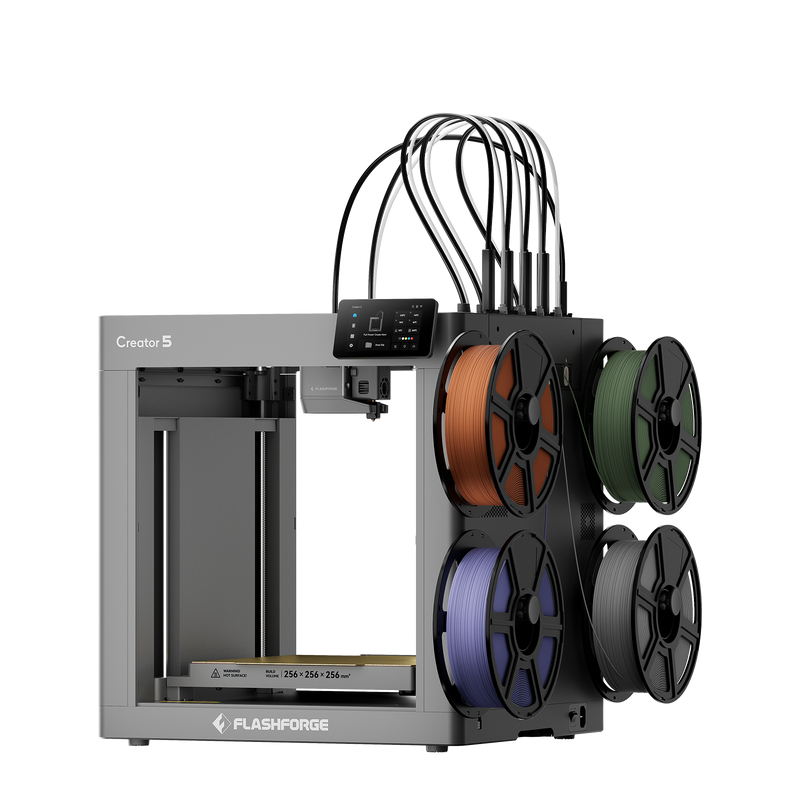
Flashforge Creator 5: An Open-Frame Design
The Creator 5 is designed for users who want multi-colour and multi-material printing without paying for active chamber heating.
Its open-frame design provides easy access to the print area and works well for many common filaments, including PLA and PETG. Compatible TPU and support materials can also be used according to the manufacturer's requirements.
The Creator 5 is worth considering for:
-
Colourful decorative models
-
Figurines and display pieces
-
Educational projects
-
Product appearance prototypes
-
Everyday prints using common materials
-
Small-scale creative production
For users who primarily print common filaments, an actively heated chamber may not provide enough additional value to justify the extra cost.
Flashforge Creator 5 Pro: A Heated, Enclosed Chamber
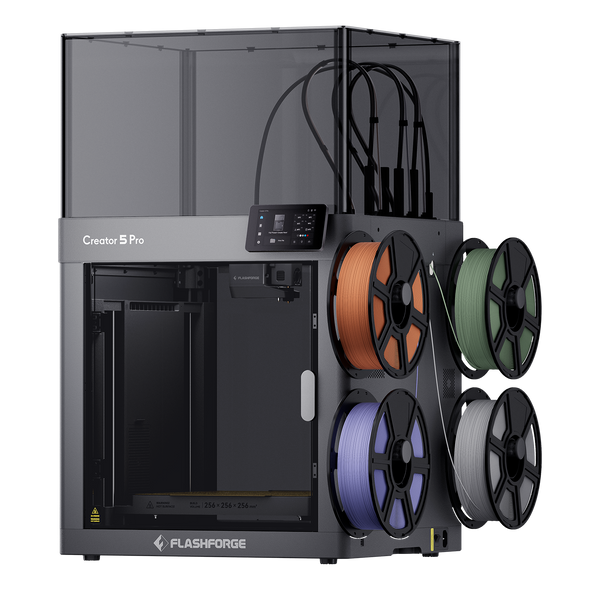
The Creator 5 Pro adds a fully enclosed frame and active chamber heating up to 65°C.
A controlled chamber can help reduce temperature fluctuations around a printed part. This is especially valuable for materials that tend to shrink as they cool, potentially causing warping, corner lifting, or cracking.
The Pro model also includes HEPA 13 and activated-carbon filtration, along with additional airflow and enclosure features.
These upgrades make the Creator 5 Pro a stronger candidate for users working with materials such as ABS, ASA, nylon, polycarbonate, and compatible fibre-reinforced engineering filaments.
An enclosure and filtration system do not eliminate every printing or ventilation concern. Users should still follow the filament manufacturer's safety guidance and ensure the workspace is appropriate for the materials being printed.
Which model wins? The Creator 5 Pro is the clear choice if active chamber heating and an enclosed printing environment are important to your work.
3. Which Filaments Can You Print?
Your material requirements are one of the most useful ways to decide between the two models.
Materials for the Creator 5
The open-frame Creator 5 is well suited to everyday materials and creative applications.
Common choices include:
-
PLA for models, decorations, and prototypes
-
PETG for general-purpose parts
-
Compatible TPU for flexible components
-
PLA-CF and PETG-CF for selected reinforced applications
-
Compatible support materials such as PVA and BVOH
Carbon-fibre-reinforced filaments still require appropriate nozzle and material settings. Confirm the manufacturer's compatibility recommendations before printing abrasive materials.
Materials for the Creator 5 Pro
The Creator 5 Pro supports common filaments as well as a wider range of engineering materials when used in the appropriate configuration.
Potential choices include:
-
ABS for functional housings and prototypes
-
ASA for outdoor-use components where its properties are suitable
-
PA and compatible nylon-based materials
-
PC for selected demanding applications
-
Fibre-reinforced materials such as PA-CF and other supported composites
Not every filament listed by a manufacturer is suitable for every printer configuration or every part. Some materials require drying, specific build surfaces, particular nozzle types, or other precautions.
The Pro's heated enclosure can improve the printing environment for chamber-sensitive materials, but it does not automatically guarantee a successful print or make every engineering filament compatible.
Which model wins? Choose the Creator 5 for common-material workflows. Choose the Creator 5 Pro if your work regularly involves chamber-sensitive engineering materials.
4. Print Speed and Build Volume
At first glance, the two models are closely matched in their core printing specifications.
Both offer:
-
A 256 × 256 × 256 mm build volume
-
Four independent toolheads
-
A maximum advertised travel speed of 600 mm/s
-
A maximum nozzle temperature of 320°C
-
A maximum bed temperature of 120°C
Because the build volume is the same, the Pro does not provide a larger printing area. You can fit similarly sized models on either machine, assuming the same orientation and support requirements.
Actual print time depends on more than the advertised maximum speed. Model geometry, layer height, acceleration, material flow, toolhead changes, and support structures can all affect the result.
For multi-colour projects, the independent toolhead design can improve efficiency by reducing repeated filament changes. For engineering parts, the Pro's chamber control may be more important than a small difference in printing time.
Which model wins? Neither has a clear advantage in advertised travel speed or build volume. Choose based on the printing environment and materials you need.
5. What About Air Filtration and Temperature Control?
For some users, the Creator 5 Pro's enclosure is about more than material performance.
The Pro includes a HEPA 13 filter and activated-carbon filtration system designed to help manage airborne particles and certain emissions. It also provides active chamber heating and additional airflow controls.
These features may be particularly relevant when printing materials that can produce more noticeable emissions or require a more controlled thermal environment.
However, integrated filtration should not be treated as a substitute for suitable room ventilation or safe material handling. Follow Flashforge's recommendations and the safety information supplied with each filament.
The standard Creator 5 does not include the same integrated enclosure and filtration package. Users should take their intended materials and workspace into account when choosing an open-frame printer.
Which model wins? The Creator 5 Pro offers the more complete enclosed-printing environment.
6. Which Printer Is Better for Your Applications?
The best printer depends on what you want to produce, not simply which model has more features.
Choose the Creator 5 for Creative Multi-Colour Printing
The Creator 5 is a practical option for users whose projects focus on colour, appearance, and everyday materials.
It may be a good fit for:
-
Makers producing colourful models and decorations
-
Schools and educational workshops
-
Small businesses creating personalized products
-
Designers developing visual prototypes
-
Users who want four independent toolheads without active chamber heating
If most of your projects use PLA and PETG, the standard Creator 5 may provide the capabilities you need without paying for features you rarely use.
Choose the Creator 5 Pro for Engineering and Functional Parts
The Creator 5 Pro is better suited to users who need a more controlled printing environment and plan to work with a wider range of engineering materials.
Potential applications include:
-
Functional prototypes
-
Custom housings and brackets
-
Engineering design iterations
-
Jigs and fixtures
-
Selected reinforced components
-
Small-batch production using compatible engineering filaments
For these workflows, a failed print or warped part can cost more than the material alone. Chamber control can help reduce some common problems with demanding filaments, although correct material preparation and print settings remain essential.
7. Is the Creator 5 Pro Worth the Upgrade?
The Creator 5 Pro is worth considering if you will regularly use its additional features.
The upgrade provides an enclosed frame, active chamber heating up to 65°C, integrated filtration, and additional enclosure controls. These features can expand the range of materials and applications worth considering.
However, if your printing mainly involves PLA, PETG, decorative models, and multi-colour projects, you may not benefit enough from the Pro's upgrades to justify the additional expense.
Before deciding, consider three questions:
-
What materials will you print most often? Common filaments may not require a heated chamber.
-
Where will the printer operate? Consider access, ventilation, workspace requirements, and the benefits of an enclosure.
-
What are you producing? Visual prototypes and colourful models have different requirements from functional engineering components.
The right printer is the one that meets your actual workflow rather than the one with the longest feature list.
Flashforge Creator 5 vs Creator 5 Pro: Final Verdict
Both printers share the same foundation: four independent toolheads, a 256 mm cubed build volume, and high-speed printing capabilities. The biggest difference is the environment in which they print.
Choose the Flashforge Creator 5 if you want multi-colour and multi-material printing for creative projects, education, common filaments, and light production. It offers the core four-toolhead experience without active chamber heating.
Choose the Flashforge Creator 5 Pro if you regularly print engineering materials and want an enclosed chamber, active heating, integrated filtration, and additional temperature control.
In short, the Creator 5 is the more straightforward choice for everyday multi-colour printing, while the Creator 5 Pro is designed for users who need the extra control required by more demanding materials.
Explore Flashforge 3D Printers at DigitMakers
Looking for a multi-colour 3D printer for your next project? Explore the Flashforge range at DigitMakers to compare available models, materials, and accessories.
If you are unsure which Creator 5 model suits your application, consider the filaments you plan to use and the types of parts you need to produce before making your decision.
- Choosing a selection results in a full page refresh.